I've been doing a lot of research into how open-source software can and can't be used in Enterprises. In January, I wrote a post called "Is the LAMP Stack Appropriate for Enterprise Use?" That looked into conditions that using it may be a good idea.
I was inspired this morning when reading a blog post about 21 popular brands that use wordpress. Wordpress is an open-source content management platform based on PHP, and I was blown away to learn that eBay, Yahoo, Ford, and the Wall Street Journal all use wordpress in the architectures of their externally-facing blogs
Who would have thought?
Showing posts with label Standards. Show all posts
Showing posts with label Standards. Show all posts
Friday, July 10, 2009

Thursday, June 11, 2009
Tuesday, April 28, 2009
Web Browser Standards Compliance Testing
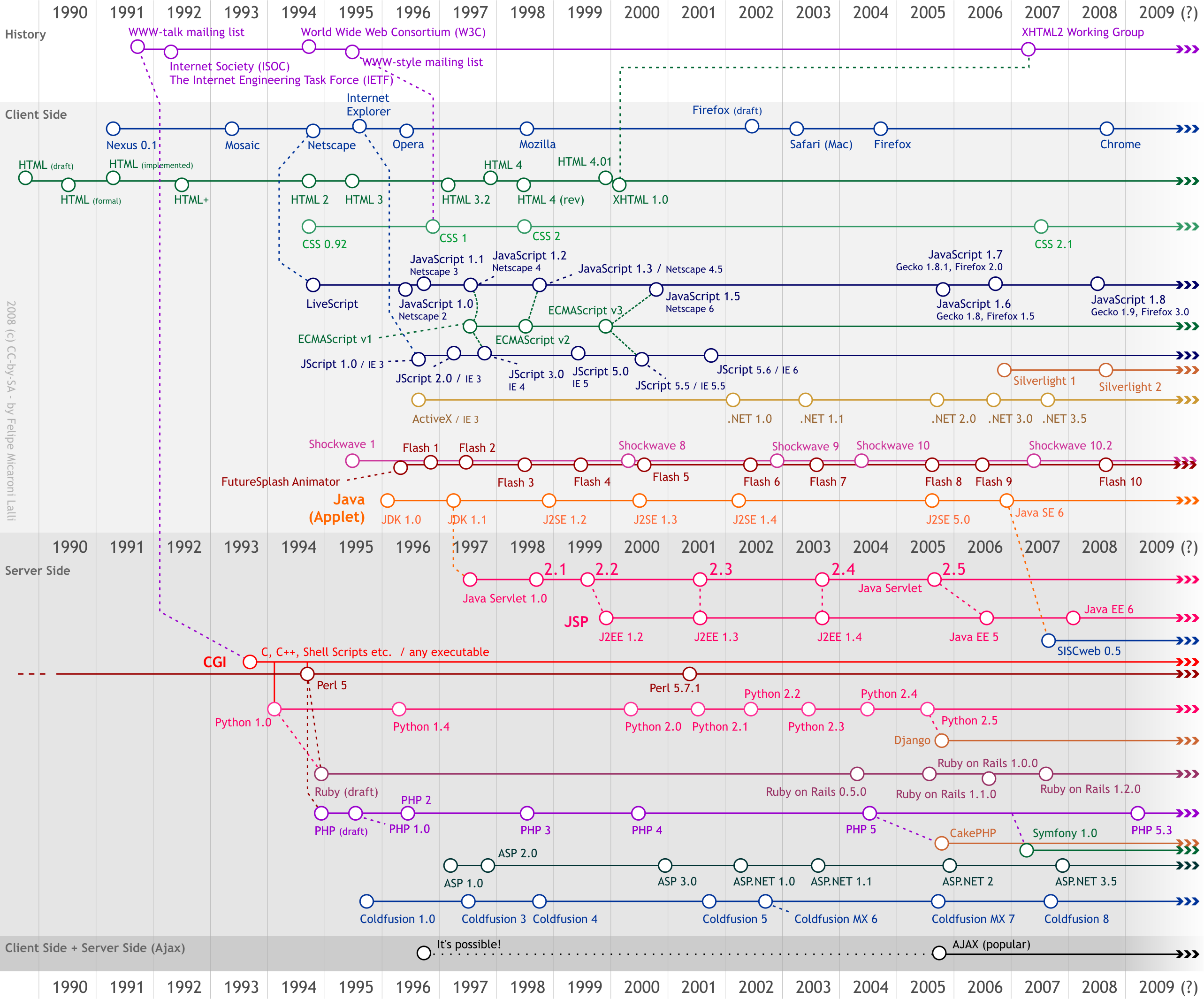
As anyone that's done web programming can tell you, browser compatibility can be a headache. When I first threw html on the web 10 years ago, trying to get pages to render the same way in IE and Netscape was sometimes a challenge because W3C standards weren't followed consistently. Even now, compliance is an issue. Firefox, IE, Chrome, and Safari all take liberties with some standards, and the result can be a nightmare for developers.
Best practices dictate development in compliance with standards, and then managing any big problems with compatibility if required. Practically, some developers change style sheets for each browser or simply design their sites to look good in the browser most of their readers use and make tweaks when required for other browsers.

Acid2 is a test page developed to highlight the inconsistent adherence to W3C standards:
Acid2 is a test page published and promoted by the Web Standards Project to expose web page rendering flaws in web browsers and other applications that render HTML. It was developed in the spirit of Acid1, a relatively narrow test of compliance with the Cascading Style Sheets 1.0 (CSS1) standard, and was released on April 13, 2005. Like Acid1, an application passes the test if the way it displays the test page matches a reference image.
Acid2 tests aspects of HTML markup, CSS 2.1 styling, PNG images, and data URIs. The Acid2 test page will be displayed correctly in any application that follows the World Wide Web Consortium and Internet Engineering Task Force specifications for these technologies. These specifications are known as web standards because they describe how technologies used on the web are expected to function.
While at the time of Acid2's release no web browser passed the test, Acid2 was designed with Microsoft Internet Explorer particularly in mind. The creators of Acid2 were dismayed that Internet Explorer did not follow web standards and because of this Internet Explorer was prone to display web pages differently from other browsers. When such a discrepancy between browsers is encountered, web developers spend time tweaking their web pages in order to make the pages be displayed correctly in different browsers. Acid2 represented a challenge to Microsoft to bring Internet Explorer in line with web standards, making it easier to design web pages that work as intended in any web browser.
Check out the wikipedia article on Acid2 for some pictures of how the most popular browsers don't adhere to standards, and check out the site itself to see how the browser you're using measures up.
Updated: Firefox Beta Scores 93 On Acid3 Test (via Slashdot)
Best practices dictate development in compliance with standards, and then managing any big problems with compatibility if required. Practically, some developers change style sheets for each browser or simply design their sites to look good in the browser most of their readers use and make tweaks when required for other browsers.
Acid2 is a test page developed to highlight the inconsistent adherence to W3C standards:
Acid2 is a test page published and promoted by the Web Standards Project to expose web page rendering flaws in web browsers and other applications that render HTML. It was developed in the spirit of Acid1, a relatively narrow test of compliance with the Cascading Style Sheets 1.0 (CSS1) standard, and was released on April 13, 2005. Like Acid1, an application passes the test if the way it displays the test page matches a reference image.
Acid2 tests aspects of HTML markup, CSS 2.1 styling, PNG images, and data URIs. The Acid2 test page will be displayed correctly in any application that follows the World Wide Web Consortium and Internet Engineering Task Force specifications for these technologies. These specifications are known as web standards because they describe how technologies used on the web are expected to function.
While at the time of Acid2's release no web browser passed the test, Acid2 was designed with Microsoft Internet Explorer particularly in mind. The creators of Acid2 were dismayed that Internet Explorer did not follow web standards and because of this Internet Explorer was prone to display web pages differently from other browsers. When such a discrepancy between browsers is encountered, web developers spend time tweaking their web pages in order to make the pages be displayed correctly in different browsers. Acid2 represented a challenge to Microsoft to bring Internet Explorer in line with web standards, making it easier to design web pages that work as intended in any web browser.
Check out the wikipedia article on Acid2 for some pictures of how the most popular browsers don't adhere to standards, and check out the site itself to see how the browser you're using measures up.
Updated: Firefox Beta Scores 93 On Acid3 Test (via Slashdot)
Tuesday, March 17, 2009
Decision Trees and Best Practices: COTS vs. Custom (Build vs. Buy)
Here are some points to consider when deciding between a commerical, off the shelf (COTS) system and custom development:
Is a COTS system available that meets most of the requirements?
(If yes, a COTS system may be a good option: (Avoid reinventing the wheel))
If so, is there a fully exposed API available?
(This is essential to integration / customization)
If so, is the source code available?
(This is essential to deep integration / customization)
Is the system designed to meet a core business function / create a competitive advantage ?
(If so, custom development may be a good option: See Joel Sposky's: In Defense of Not-Invented-Here Syndrome)
If so, will custom development allow for code reuse in future / other systems?
(There are many advantages to reusing existing code)
What is the TCO for the custom application vs. the COTS product?
Are there time constraints that could not be met with custom development?
(If yes, a COTS system may be a good option)
Decision Trees and Best Practices: Local vs. Centralized Processing (Thick client vs. Thin client)
Here are some points to consider when deciding between Local and Centralized processing:
Is a reliable network available everywhere the application will be installed?
(If no, local processing may be a better option)
Does the application require real-time data?
(If yes, centralized processing may be a better option)
Does the application require intensive CPU effort or high disk IO?
(If yes, centralized processing or a thick local processing may be options)
Does the application need offline capabilities?
(If yes, local processing may be a better option)
Are there security concerns for having the data consolidated in remote environments?
(If yes, centralized processing with distributed thin clients may be a better option)
Is there existing hardware at the sites that can be leveraged to run the application?
(If yes, centralized processing may be a good option: A thin client will cost less to deploy and maintain, they are more secure, and less valuable to thieves)
Are there existing applications that the same user group is working with, and how are these applications deployed?
(There may be economies of scale by consolidating applications into one design pattern)
Decision Trees and Best Practices: Web vs. Desktop Development (Online vs. Smart-Client)
Here are some thoughts on helping to decide between Online and Desktop developement. Although the line is being blurred by technologies like AJAX, Sliverlight, and Flex, there are still some times when one is better than the other
Criteria:
There 4 main factors to consider: Availability, responsiveness, clarity, and utility
Is the application targeted to users with different OS configurations?
(If yes, a desktop client may be a better option)
Will a web application be able to provide the availability, responsiveness, clarity, and utility that can be delivered with a desktop application?
(If yes, a web client may be a better option)
Does the application require OS-type functionality for sorting and editing data? (Although AJAX / asynchronous JS has made possible much richer desktop-like functionality to web applications, the desktop still offers advantages in this area)
(If yes, a desktop client may be a better option)
What is the primary objective of the app - data manipulation, or data viewing?
(If data manipulation, a desktop client may be a better option, if viewing, proceed to the next question)
What is the number of data points/records that need to be viewed/edited together on one screen?
(If the number is high, a desktop client may be a better option)
Does the application need offline capabilities?
(If yes, a desktop client may be a better option)
Wednesday, January 21, 2009
The whitehouse.gov site rearchitected in ASP.NET 2.0 and launched on Barack Obama's inauguration
Yesterday was an historic day for the US and the world. Politics aside, it's great to see an African American get sworn in as president. I lived in rural Kentucky for a couple of years as a child, and not all of my neighbors were enlightened enough to think that having a black president would even be possible.
He's bringing some big changes with him. Within hours of Obama's inauguration, he requested a halt to military trials at the Guantanamo detention camp, and he is expected to discuss plans for an $825 billion (USD) rescue economic package.
From an IT side, some interesting changes are coming as as well. Julius Genachowski is starting his reign as technology czar, and whitehouse.gov was re-architeced in .Net.
Here are some of the specifications, courtesy dotnetperls:
The whitehouse.gov site uses IIS 6.0. Its HTTP headers include the key/value pair "Server: Microsoft-IIS/6.0". The site does not use the latest software from Microsoft, IIS/7.
The whitehouse.gov site uses ASP.NET 2.0. The HTTP header that identifies the software says "X-Aspnet-Version: 2.0.50727". There is a way for this header to be removed, which saves about 30 bytes of bandwidth on every response.
The whitehouse.gov site uses JQuery 1.2.6. The JQuery JavaScript, in its minified form, is present in the /includes/ directory. Many developers use the JQuery from Google's servers for improved performance and lower latency. This could improve the site's performance.
The whitehouse.gov site uses GZIP compression. All text content from the site is compressed with GZIP, which improves performance significantly.Uncompressed page: 48218 bytes
Compressed page: 8370 bytes
Savings: ~80%
The whitehouse.gov site uses Vary: Accept-Encoding. The Vary: Accept-Encoding HTTP header is a way to force proxies not to server GZIP content to agents that cannot decode it.
The whitehouse.gov site uses Cache-Control: private and max-age. It uses the value "max-age=85895", which is about 1 day. Therefore, the html pages should be cached for 1 day on your local computer.
The whitehouse.gov site uses Web Trends Live tracking. WebTrends states that it is a "leading provider of web analytics and consumer-centric marketing intelligence solutions." [webtrendslive.com]
The whitehouse.gov site uses the meta keywords tag. This is odd as very few people on the Internet who visit this site will need to reminded what it is about. The meta tag states:
The whitehouse.gov site uses ViewState. This is a hidden form that allows the site to store server-side data on the browsers. ASP.NET automatically decodes the ViewState sent by the browsers. It is not meant to be decoded by the browser.
The whitehouse.gov site uses WebResource.axd. This is a script file that is generated by ASP.NET. These cannot usually be cached efficiently and I have found them to degrade performance.
The whitehouse.gov site has lots of whitespace characters. These are not wasteful if you have GZIP compression enabled on your browser, but the site is likely 20% or more larger than it needs to be if these were removed.
The whitehouse.gov site has comment tags. The site uses lots of HTML comments to mark parts of the page. These could be more efficiently written as server-side comments and compiled out of the page.
The whitehouse.gov site has long ASP.NET IDs. There are many elements on the page that have very long IDs, which are mainly a waste of bandwidth usually. They could be easily removed on the server.
The whitehouse.gov site uses more GIFs than PNGs. The site uses far more GIF images than PNG images. PNG images can be optimized further, reducing bandwidth and costs. Two animated GIFs are used.
The whitehouse.gov site uses 5 stylesheets and 12 JavaScripts. The site could be much faster and lighter if it combined all of these into two files. This measurement is from one visit to the front page. Strangely, there is an admin stylesheet loaded. [First 3 lines shown]/* admin styles */
/* cms */
.adminNavigation {width:996px; position:relative; z-index:100;}
The whitehouse.gov site uses heavy JPG compression. The images look good if you don't look too closely or don't have good eyesight. The developers applied a heavy amount of compression to the JPGs. The image shown here has been enlarged and slightly recompressed.
The whitehouse.gov site uses image sprites. This is a boost to the site's efficiency, as it combines several small images into one. This is an advanced technique that is somewhat involved to implement. The sprite image is "nav-sprite.png".
The whitehouse.gov site uses Packer. Dean Edward's Packer is a utility that encodes a JavaScript file into a compressed format. The JavaScript, when downloaded, automatically unpacks itself. This is a poor optimization, as JavaScript files minimized with YUI Compressor will be smaller after GZIP compression often. [See jquery-plugins.js]eval(function(p,a,c,k,e,d)...
The decision to use Packer was likely not made by someone with a high understanding of GZIP compression or compression technologies. The byte size of the uncompressed file is smaller, but this causes the final download to be bigger. [http://dean.edwards.name/packer/]
The whitehouse.gov has a page weight of 821 KB and loaded in 1.58 seconds on my cable modem. This is around average for new and graphically-oriented sites.Load time: 1.58 seconds
Total size: 821 KB
The whitehouse.gov site has several hidden links. In the source files, mostly JavaScript, there are at least 6 embedded links. Therefore, these lucky people get the privilege of being linked from the White House.
http://www.youngpup.net/
http://sorgalla.com/jcarousel/
http://billwscott.com/carousel/
http://www.codylindley.com/
The whitehouse.gov site uses a non-transparent favicon.ico
(hat tip: slashdot)
UPDATE: Also on slashdot this morning, Obama is looking at open source.
He's bringing some big changes with him. Within hours of Obama's inauguration, he requested a halt to military trials at the Guantanamo detention camp, and he is expected to discuss plans for an $825 billion (USD) rescue economic package.
From an IT side, some interesting changes are coming as as well. Julius Genachowski is starting his reign as technology czar, and whitehouse.gov was re-architeced in .Net.
Here are some of the specifications, courtesy dotnetperls:
The whitehouse.gov site uses IIS 6.0. Its HTTP headers include the key/value pair "Server: Microsoft-IIS/6.0". The site does not use the latest software from Microsoft, IIS/7.
The whitehouse.gov site uses ASP.NET 2.0. The HTTP header that identifies the software says "X-Aspnet-Version: 2.0.50727". There is a way for this header to be removed, which saves about 30 bytes of bandwidth on every response.
The whitehouse.gov site uses JQuery 1.2.6. The JQuery JavaScript, in its minified form, is present in the /includes/ directory. Many developers use the JQuery from Google's servers for improved performance and lower latency. This could improve the site's performance.
The whitehouse.gov site uses GZIP compression. All text content from the site is compressed with GZIP, which improves performance significantly.Uncompressed page: 48218 bytes
Compressed page: 8370 bytes
Savings: ~80%
The whitehouse.gov site uses Vary: Accept-Encoding. The Vary: Accept-Encoding HTTP header is a way to force proxies not to server GZIP content to agents that cannot decode it.
The whitehouse.gov site uses Cache-Control: private and max-age. It uses the value "max-age=85895", which is about 1 day. Therefore, the html pages should be cached for 1 day on your local computer.
The whitehouse.gov site uses Web Trends Live tracking. WebTrends states that it is a "leading provider of web analytics and consumer-centric marketing intelligence solutions." [webtrendslive.com]
The whitehouse.gov site uses the meta keywords tag. This is odd as very few people on the Internet who visit this site will need to reminded what it is about. The meta tag states:
[meta content="President, Barack Obama, White House, United States of America, 44th President, White House history, President Obama, Barck, Barek, Barak, Barrack, Barrak, Obma, Barack" name="keywords"]This won't do much for improving the Google PageRank of whitehouse.gov. I think searches for Barack Obama will likely reach this site in any case.
The whitehouse.gov site uses ViewState. This is a hidden form that allows the site to store server-side data on the browsers. ASP.NET automatically decodes the ViewState sent by the browsers. It is not meant to be decoded by the browser.
The whitehouse.gov site uses WebResource.axd. This is a script file that is generated by ASP.NET. These cannot usually be cached efficiently and I have found them to degrade performance.
The whitehouse.gov site has lots of whitespace characters. These are not wasteful if you have GZIP compression enabled on your browser, but the site is likely 20% or more larger than it needs to be if these were removed.
The whitehouse.gov site has comment tags. The site uses lots of HTML comments to mark parts of the page. These could be more efficiently written as server-side comments and compiled out of the page.
The whitehouse.gov site has long ASP.NET IDs. There are many elements on the page that have very long IDs, which are mainly a waste of bandwidth usually. They could be easily removed on the server.
The whitehouse.gov site uses more GIFs than PNGs. The site uses far more GIF images than PNG images. PNG images can be optimized further, reducing bandwidth and costs. Two animated GIFs are used.
The whitehouse.gov site uses 5 stylesheets and 12 JavaScripts. The site could be much faster and lighter if it combined all of these into two files. This measurement is from one visit to the front page. Strangely, there is an admin stylesheet loaded. [First 3 lines shown]/* admin styles */
/* cms */
.adminNavigation {width:996px; position:relative; z-index:100;}
The whitehouse.gov site uses heavy JPG compression. The images look good if you don't look too closely or don't have good eyesight. The developers applied a heavy amount of compression to the JPGs. The image shown here has been enlarged and slightly recompressed.
The whitehouse.gov site uses image sprites. This is a boost to the site's efficiency, as it combines several small images into one. This is an advanced technique that is somewhat involved to implement. The sprite image is "nav-sprite.png".
The whitehouse.gov site uses Packer. Dean Edward's Packer is a utility that encodes a JavaScript file into a compressed format. The JavaScript, when downloaded, automatically unpacks itself. This is a poor optimization, as JavaScript files minimized with YUI Compressor will be smaller after GZIP compression often. [See jquery-plugins.js]eval(function(p,a,c,k,e,d)...
The decision to use Packer was likely not made by someone with a high understanding of GZIP compression or compression technologies. The byte size of the uncompressed file is smaller, but this causes the final download to be bigger. [http://dean.edwards.name/packer/]
The whitehouse.gov has a page weight of 821 KB and loaded in 1.58 seconds on my cable modem. This is around average for new and graphically-oriented sites.Load time: 1.58 seconds
Total size: 821 KB
The whitehouse.gov site has several hidden links. In the source files, mostly JavaScript, there are at least 6 embedded links. Therefore, these lucky people get the privilege of being linked from the White House.
http://www.youngpup.net/
http://sorgalla.com/jcarousel/
http://billwscott.com/carousel/
http://www.codylindley.com/
The whitehouse.gov site uses a non-transparent favicon.ico
(hat tip: slashdot)
UPDATE: Also on slashdot this morning, Obama is looking at open source.
Friday, January 16, 2009
Is the LAMP stack appropriate for Enterprise use?
I spend a lot of time researching technical platforms and architectural components, and working with other developers on determining what's most appropriate for our environment.
Our standards are constantly evolving, but right now we've got a spot for 3 main platforms and 11 main components. One thing I've noticed through the years is how committed people become to their platforms and languages, and how quickly some people will become a vocal Evangelist for their choices.
Obviously, in order to make a choice about enterprise standards, the decisions need to be based on facts and not on emotions, so research is an essential first step. Working with the developers on standards so that all the stakeholders have ownership is the next logical step.
19 answers came in, and in general, they were positive about the appropriateness of using the LAMP stack as an Enterprise Standard. However, to be fair, the types of Enterprise most often cited were web-based (like Google), or those that grew rapidly from being start-ups (like Facebook); They didn't really focus on the Proctor and Gamble, AT&T, or Citigroup-type Enterprises.
Here's the answer that I voted as the best (from a user named S.Lott), even though it wasn't the one with the most votes:
To be honest though, my only recent personal experience developing on the LAMP stack was customizing a gallery for a website I run for my dad and his colleagues.
Furthermore, I'm still not convinced that it's all that appropriate for enterprise based systems - Especially those that have to do with manufacturing and logistics.
Check out the question and answers in their entirety here.
UPDATE: Sometimes the LAMP Stack is Appropriate for Enterprise Use: Externally-Facing Blogs
Our standards are constantly evolving, but right now we've got a spot for 3 main platforms and 11 main components. One thing I've noticed through the years is how committed people become to their platforms and languages, and how quickly some people will become a vocal Evangelist for their choices.
Obviously, in order to make a choice about enterprise standards, the decisions need to be based on facts and not on emotions, so research is an essential first step. Working with the developers on standards so that all the stakeholders have ownership is the next logical step.

In terms of research, I thought it'd be interesting to throw the LAMP stack question (Linux, Apache, MySQL, PHP / Ruby / Python) out to the programming community via StackOverflow.
As discussed in a previous post, I think StackOverflow is pretty neat. I've been impressed with the number of eyes technical questions get in front of, and with the amazing speed that insightful answers flow in.
That's why I wanted to pitch the question to the StackOverflow community. Here's the question as posed:
Is the LAMP stack appropriate for Enterprise use?
To be clear, by "Enterprise", I mean a large or very large company, where security, robustness, availability of skill sets, Total Cost of Ownership (TCO), scalability, and availability of tools are key considerations. Said another way, a company that looks for external adoption of frameworks / architecture - Something ubiquitous will be seen as more "valid" than something exotic / esoteric in this kind of environment.
I've seen use cases where Oracle, IBM, and Sun have implemented systems on the LAMP stack for various Enterprises. I've also seen examples where websites like yellowpages.com (Ruby on rails) and Facebook (php) are built on it. However, none of these examples are exactly what I'm looking for.
I'm really trying to find examples where it is an Enterprise standard at a very large bank (I.e., Citigroup), Telecom company (I.e., AT&T), or manufacturer (I.e., Proctor and Gamble). Just to be clear, I'm not looking for an example where it's used in a limited sense (Like at JPMorgan Chase), but where it's a core platform for systems like CRM, manufacturing systems, or HR management, as well as for internal and external websites.
The perception I've seen so far is that applications built on the LAMP stack perform slower and are less flexible. Some of the arguments I've heard are:
- Linux is seen as not as well supported as Unix, Solaris, or Windows Servers.
- Apache is harder to configure and maintain than web servers like BEA WebLogic or IIS.
- MySQL is a "not ready for prime time" DB for hobbyists, and not a competitor for SQL Server or Oracle.
- PHP / Ruby on rails are optimized for CRUD (Create, Read, Update and Delete operations). Although this is an advantage when building CRUD-intensive web applications, both perform slower than Java/JEE or C# (which are both common Enterprise standards). Furthermore, a lot of applications and systems (like manufacturing systems) have a lot of non-CRUD functionality that may be harder to build with PHP or Ruby, or even Python.
Can anyone please provide arguments to support or refute the idea of the LAMP stack being appropriate for the Enterprise?
Thanks!
19 answers came in, and in general, they were positive about the appropriateness of using the LAMP stack as an Enterprise Standard. However, to be fair, the types of Enterprise most often cited were web-based (like Google), or those that grew rapidly from being start-ups (like Facebook); They didn't really focus on the Proctor and Gamble, AT&T, or Citigroup-type Enterprises.
Here's the answer that I voted as the best (from a user named S.Lott), even though it wasn't the one with the most votes:
In general, the answers were helpful and revealed a deep background knowledge of the users. (Except for one: "no it doesn't scale, lol :D" - The user was downmodded into oblivion.)"but where it's a core platform for systems like CRM and HR, as well as for internal and external websites"
"but where it's a core platform for systems like CRM and HR, as well as for internal and external websites"
First, find a LAMP CRM or HR application. Then find a customer for the LAMP CRM or HR application.
Sadly, there aren't a lot of examples of item 1. Therefore, your case is proven. It can't be used for enterprise applications because -- currently -- there aren't any of the applications you call "enterprise".
Your other points, however, are very interesting.
1. Linux is seen as not as well supported as Unix, Solaris, or Windows Servers.I think Red Hat would object strongly to this. Give them a call. I think they'll make a very persuasive sales pitch. Read their success stories.
2. Apache is harder to configure and maintain than web servers like BEA WebLogic or IIS.By whom? Apache web site managers? Or IIS web site managers? This is entirely subjective.
3. MySQL is a "not ready for prime time" DB.Take it up with Sun Microsystems. I think they'd object strongly to this. Give them a call. I think they'll make a very persuasive sales pitch.
Read their success stories.
4. PHP / Ruby on rails are optimized for CRUD, and both are slowly performing.Could be true. Java and Python might be faster.
PHP and Ruby aren't the last word in LAMP.
To be honest though, my only recent personal experience developing on the LAMP stack was customizing a gallery for a website I run for my dad and his colleagues.
Furthermore, I'm still not convinced that it's all that appropriate for enterprise based systems - Especially those that have to do with manufacturing and logistics.
Check out the question and answers in their entirety here.
UPDATE: Sometimes the LAMP Stack is Appropriate for Enterprise Use: Externally-Facing Blogs
Wednesday, January 23, 2008
The Howard Roark style of Technical Architecture
Defining and enforcing technical standards are part of the job of a technical architect. There are standards for frameworks, programming languages, and databases, among other things. It's natural that enforcing this type of standard is going to raise some angst. It's not easy to convince a development team that not letting them use their language of choice is adding value.
Realistically, there needs to be an exceptions process. There are lots of reasons for not adhering to a standard. For instance, if a team has a dozen developers coding C# applications and it's proposing to maintain a .Net application that already exposes it's core functionality through web services, it makes sense to let them do it even if the corporate standard is J2EE (At least for the short term). In the real world, this kind of compromise is necessary. For some people though, this kind of compromise just can't be justified.
The archetypal non-compromising architect is Howard Roark from Ayn Rand's novel The Fountainhead . Although he was a fictional bricks-and-mortar architect, he's the perfect backdrop for a situation like this. In the book, Howard is an idealist with uncompromising vision. He is exceptionally talented and refuses to make concessions for anyone if his standard will be degraded.
In the book, Howard is repeatedly excluded from opportunities an even works as a labourer in a quarry at one point because he refuses to make compromises. Despite all of this, he eventually becomes successful. It's an inspiring story, and the idealism of is glorified. It makes this kind of decisiveness appealing.
Pragmatically though, skill sets, licenses, and preferences, can sometimes form a cogent argument for making compromises. Because of this, I think it's in a technical architect's rational self-interest to occasionally make exceptions.
Realistically, there needs to be an exceptions process. There are lots of reasons for not adhering to a standard. For instance, if a team has a dozen developers coding C# applications and it's proposing to maintain a .Net application that already exposes it's core functionality through web services, it makes sense to let them do it even if the corporate standard is J2EE (At least for the short term). In the real world, this kind of compromise is necessary. For some people though, this kind of compromise just can't be justified.
The archetypal non-compromising architect is Howard Roark from Ayn Rand's novel The Fountainhead
. Although he was a fictional bricks-and-mortar architect, he's the perfect backdrop for a situation like this. In the book, Howard is an idealist with uncompromising vision. He is exceptionally talented and refuses to make concessions for anyone if his standard will be degraded.In the book, Howard is repeatedly excluded from opportunities an even works as a labourer in a quarry at one point because he refuses to make compromises. Despite all of this, he eventually becomes successful. It's an inspiring story, and the idealism of is glorified. It makes this kind of decisiveness appealing.
Pragmatically though, skill sets, licenses, and preferences, can sometimes form a cogent argument for making compromises. Because of this, I think it's in a technical architect's rational self-interest to occasionally make exceptions.
Subscribe to:
Posts (Atom)

 Posts

